
Understanding Memory Architecture for AI Agents: A Comprehensive Guide
Building AI agents that can actually remember and learn from interactions isn't just about throwing data into a database. It requires thoughtful architecture, understanding different memory types, and

The Foundation: Memory as Context
Before diving into specific memory types and architectures, there’s one critical concept to understand: all memory ultimately becomes text in your LLM’s context window.
No matter how sophisticated your database structure or how clever your retrieval mechanism, everything you store and retrieve will eventually be inserted into the prompt you send to your language model. This simple truth shapes every decision you make about memory architecture.
Think of it this way: your system message and user message consist of instructions (what the agent should do) and memory (what the agent should know). The challenge is that you have a fixed context window size, so you must carefully balance:
Speed of querying and retrieving memory
Importance of the information retrieved
Volume of memory to include without overwhelming the model
Cost in tokens for each request
The art of memory design is deciding what information to retrieve, how much to include, and how to structure it so your agent performs optimally for its specific task.
The Three Retrieval Methods
When we talk about databases for AI agents, we’re really talking about retrieval methods. Understanding this distinction is crucial for designing effective memory systems.
1. Guaranteed Retrieval (Structured Databases)
Traditional databases like PostgreSQL and MySQL provide deterministic, precise retrieval. When you query for a user’s email address or the timestamp of their last login, you get exactly what you asked for—or you get nothing. There’s no ambiguity.
Best for:
User profiles and preferences
Transaction history
Exact facts and settings
Time-ordered events
Any data where precision is non-negotiable
2. Probabilistic Retrieval (Vector Search)
Vector databases work fundamentally differently. They convert your text into numerical coordinates (embeddings) and find similar points in multidimensional space.
Imagine your documents as pins on a global map. When you search, you’re essentially shining a light around a location and capturing all pins within the illuminated area. You’ll discover conceptually similar content, but:
You cannot rely on finding all relevant matches
The ranking may surprise you (most relevant isn’t always #1)
It excels at finding shared meaning and unexpected connections
It’s fundamentally imprecise but incredibly powerful for exploration
Best for:
Finding conceptually similar past conversations
Semantic search across documentation
Discovering related facts or patterns
Cases where you need “similar enough” rather than “exact”
3. Hybrid Retrieval (The Emerging Standard)
The future of agent memory is combining structured databases with vector search. This hybrid approach gives you:
Precise retrieval when you need it
Semantic discovery when it helps
Structured metadata linking both systems together
Most production AI agents use this approach, and you’ll see why in the examples below.
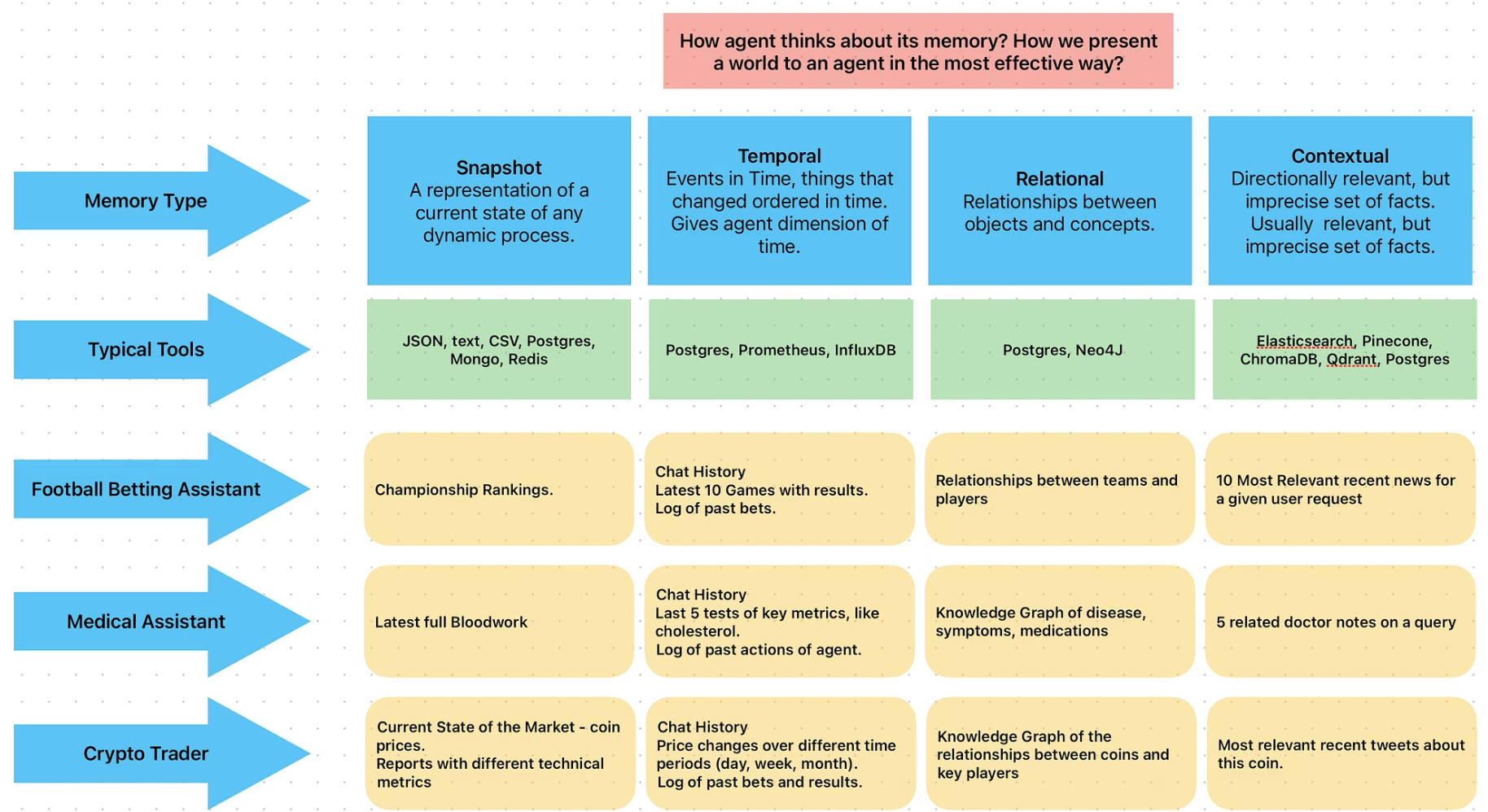
The Four-Type Memory Framework
When designing memory for an agent, I find it helpful to think about what aspects of reality you want to represent. Here’s a framework that covers most use cases:
1. Snapshot Memory
What it is: The current, correct representation of any dynamic process state.
Think of this as a photograph of “right now”—the latest information about something that changes over time, condensed to fit in your context window.
Examples:
Championship rankings for a sports betting agent
Current stock market positions for a trading agent
Latest blood work results for a medical assistant
User preferences and settings for a personal assistant
Current project state in JSONB format
Typical storage: JSON, JSONB fields in PostgreSQL, document databases, or even structured text
2. Temporal Memory
What it is: Time-ordered events that show how things have changed and evolved.
This gives your agent the dimension of time—an understanding of dynamics, trends, and sequences.
Examples:
Chat history (last 10 messages)
Results of the last 10 games for a sports analyst
Price changes over different time periods for crypto trading
Git commit history for code review
Recent support tickets for customer service
Typical storage: PostgreSQL with timestamps, time-series databases (InfluxDB for metrics), standard SQL databases
3. Relational Memory
What it is: Knowledge graphs representing relationships between objects and concepts.
This is hierarchical information about how entities connect to each other. Not every agent needs this, but when you do need it, nothing else works as well.
Examples:
Relationships between sports teams and players
Knowledge graph of diseases, symptoms, and medications
Cryptocurrency relationships and key market players
Company organizational structure
Product dependencies and integrations
Typical storage: Neo4j (industry standard for graphs), PostgreSQL (can handle simpler graphs)
4. Contextual Memory
What it is: Broadly relevant but imprecise information retrieved through semantic search.
This is where vector databases shine—pulling additional context that helps the agent make better decisions on average, even if the retrieval isn’t perfect.
Examples:
Most relevant tweets about a cryptocurrency under discussion
Similar doctor’s notes related to a patient’s current issue
Past customer interactions with similar problems
Related documentation sections for a support query
Previous decisions the agent made in similar contexts
Typical storage: Pinecone, Qdrant, Weaviate, or PostgreSQL with pgvector extension
Important note: You don’t need all four types in every agent. Choose the types that make sense for your specific use case.
Real-World Memory Architectures
Let’s look at how these concepts come together in actual agent implementations.
Example 1: Customer Support Agent
Memory structure:
Snapshot Memory: User profile in PostgreSQL JSONB field
Contains preferences, account status, subscription tier
Agent sees the structure and key elements
Can query specific fields when needed (doesn’t load everything into context)
Temporal Memory: Time-series ticket history
Last 5-10 support interactions
Provides context about ongoing issues
May be condensed to avoid context window bloat
Contextual Memory: Vector search on support documentation
Agent formulates queries based on current ticket
Retrieves relevant solution articles
Provides up-to-date product knowledge
Why this works: The agent has precise access to user data, knows the history of interaction, and can search documentation semantically to find solutions.
Example 2: Code Review Agent
Memory structure:
Snapshot Memory: File system as hierarchical memory
Current source code state
Project structure and dependencies
Temporal Memory: Git commit history
Recent changes and their authors
Commit messages for context
Contextual Memory: Vector search on code patterns
Similar implementations across the codebase
Related comments and documentation
Historical code review comments
Why this works: The agent understands current code state, recent changes, and can find similar patterns for consistency.
Example 3: Personal Assistant
Memory structure:
Relational Memory: Knowledge graph of entities
Person-to-company relationships
Client connections and hierarchies
Snapshot Memory: Key-value store of quick facts
Personal preferences (coffee order, dietary restrictions)
Communication preferences
Important dates and reminders
External Systems as Memory: Calendar API, email
Past and future events
Communication history
Task status
Contextual Memory: Vector search on past decisions
Previous choices in similar situations
Indexed decisions with context
Why this works: Combines relationship understanding, personal preferences, real-time external data, and historical decision-making patterns.
Common Memory Pitfalls
Based on extensive work building production agents, here are the most common mistakes:
1. Over-Relying on Vector Search Alone
Vector search is powerful but imprecise. Many builders get frustrated when semantic search doesn’t consistently return the “right” results. The solution isn’t to tune the vector search endlessly—it’s to combine it with structured memory.
Fix: Use vector search for discovery and context, but structured databases for facts you must get right.
2. Context Window Bloat
More context isn’t always better. Overloading the context window leads to:
Slower responses and higher costs
Model confusion (too much information)
Decreased performance despite “more memory”
Fix: Be selective. Retrieve summaries, not full history. Give the agent tools to fetch more detail when needed.
3. Ignoring External Systems as Memory
Your calendar, email, CRM, and other systems are excellent memory sources. Don’t duplicate what already exists elsewhere.
Fix: Treat external APIs as memory interfaces. The agent queries them when needed rather than copying everything into your database.
4. No Fallback Strategy
What happens when memory retrieval fails? When the database is empty? When vector search returns nothing?
Fix: Design agents to function at a basic level without memory, then enhance with memory when available.
5. Inconsistent Document Types in Vector Storage
Storing different types of content in the same vector store leads to unpredictable results. Mixing user preferences, chat history, and documentation creates a semantic mess.
Fix: Store consistent types in each vector collection. “User preferences” in one, “documentation” in another, etc.
Best Practices for Production Memory Systems
Structure Your Vector Storage Consistently
Each vector database or table should contain the same type of information formatted consistently. If you’re storing user facts, all records should be facts. If you’re storing documentation, all records should be documentation.
Use Metadata for Hybrid Retrieval
Every vector record should include structured metadata:
user_idfor filteringtimestampfor recencycategoryortypefor classificationsource_idfor linking back to structured data
This allows you to combine semantic search with structured filtering: “Find similar conversations with this specific user in the last 30 days.”
Design for Context Window Limits
Calculate how much context you’re using:
System instructions: ~500 tokens
User message: ~100-500 tokens
Memory overhead: How much is left?
Then design your retrieval to fit comfortably within limits while leaving room for the actual conversation.
Start Simple, Then Enhance
Begin with basic chat history (temporal memory). Does it work? Add vector search for relevant facts (contextual memory). Still need more? Add structured preferences (snapshot memory). Each addition should solve a specific limitation.
Test Memory Retrieval Independently
Before integrating into your agent, test your retrieval mechanisms:
Do vector searches return sensible results?
Are structured queries getting the right data?
How does retrieval perform with empty databases?
Implementing Memory: A Practical Approach
The conceptual framework is one thing, but implementation is where theory meets reality. In my course on building AI agents with n8n, I walk through the complete process of adding memory to a working agent, including:
Setting up Supabase with PostgreSQL and pgvector
Creating Edge Functions for embedding generation and vector search
Integrating dual-memory architecture (chat history + semantic search) into n8n workflows
Debugging real issues that arise during implementation
Using modern development tools (Cursor IDE with MCP servers) to accelerate the process
The course follows a “vibe coding” approach—using AI assistance for 80% of the work while maintaining control over critical architectural decisions. You’ll see real debugging sessions, not just polished final results.
[Link to Udemy course to be added]
Conclusion: Memory Makes the Agent
A stateless chatbot can answer questions. An agent with memory can truly assist.
The difference between a toy demo and a production AI agent often comes down to memory architecture. By understanding the four memory types (snapshot, temporal, relational, contextual), the three retrieval methods (guaranteed, probabilistic, hybrid), and common pitfalls to avoid, you can design memory systems that actually work.
Remember:
All memory becomes context—design accordingly
Use the right retrieval method for each data type
Combine structured databases with vector search
Start simple and enhance based on real needs
Test memory independently before integration
The examples and frameworks in this article come from building production agents for real businesses. They’re not theoretical—they’re battle-tested approaches that work when you need your agent to remember who your users are, what they prefer, and how to help them effectively.
Whether you’re building a customer support bot, a personal assistant, or a specialized domain agent, thoughtful memory architecture is what transforms a clever demo into a genuinely useful tool.
Want to see these concepts in action? Check out my course “N8N AI Agent Creation Guide” where we transform a basic AI agent into a memory-enhanced assistant through hands-on implementation.
About the Author
Eugene Vyborov is the Founder and CEO of Ability.ai, specializing in AI agents for business transformation. He creates educational content about AI agent development and maintains the AI Agent Hub, a directory of pre-built agents.
YouTube: https://www.youtube.com/@evyborov
X/Twitter: https://x.com/evyborov
AI Agent Hub: https://hub.ability.ai/